Tensorflow, pytorch 설치
pip install torch==1.5.1+cpu torchvision==0.6.1+cpu -f https://download.pytorch.org/whl/torch_stable.html
pip install tensorflow==2.0.0-beta1
Tensorflow와 pytorch 소개
둘다 사용하는게 좋음. 둘다 익숙해져야 다른사람이 짠거 이해하기도 좋고 구현하기도 좋음.
프로젝트에 따라서 텐서가 좋을때도 토치가 좋을때도 있음
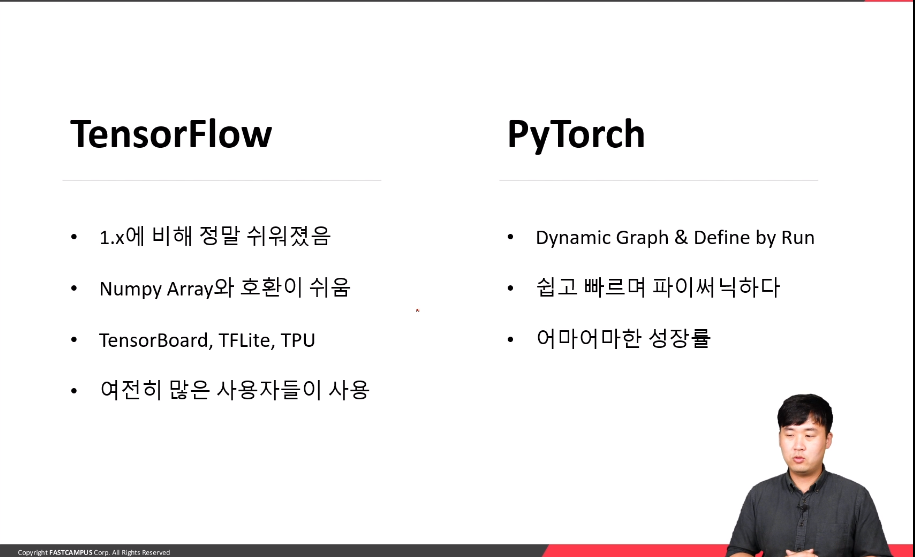
Tensorflow
이전에는 다른사람의 코드를 이해하기 어려웠음.
1.x 때보다 많이 쉬워짐
TensorBoard가 가장 큰 장점.
TFLite는 안드로이드, 모바일 사용시 유용함
TPU 사용에 유용 (colab)
사용자가 많아서 자료찾이 용이함
PyTorch
성장률이 높으며, 유저가 많이 증가하는 추세
토치 유저들끼리 소통이 쉬움
쉽고 빠르고 파이썬의 특징을 잘 살림
어느쪽이 압도적으로 유리하다는 것은 아님
한쪽에 익숙해지면 다른쪽에도 익숙해지기 쉬울 것임
회사에 입사하게된다면 회사에 맞춤으로 전환하면 됨
tensorflow 2.0 기초사용법
Tensor 생성
list -> tf
tf.constant([1,2,3])
array -> tf
arr = np.array([1,2,3])
tensor = tf.constant(arr)
dtype변환
tf.cast(tensor, dtype=tf.float32) 난수생성
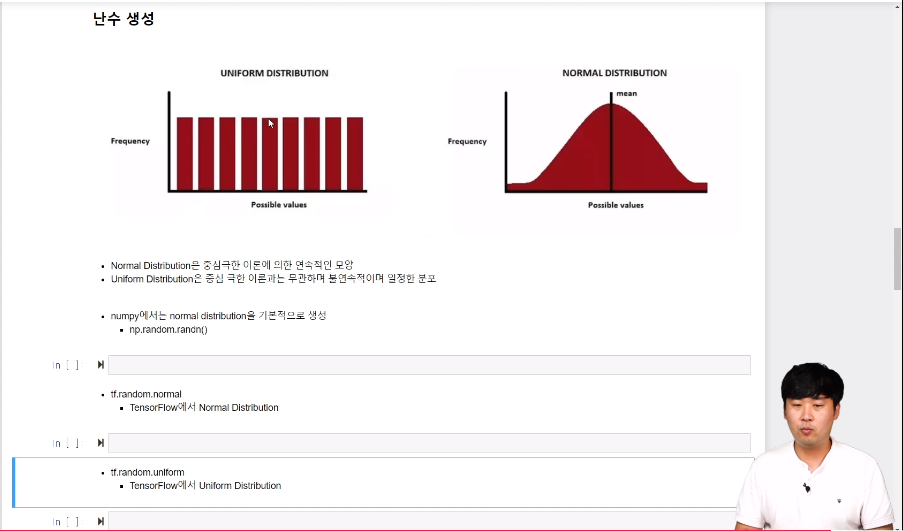
- Normal Distribution은 중심극한 이론에 의한 연속적인 모양
- Uniform Distribution은 중심 극한 이론과는 무관하며 불연속적이며 일정한 분포
#numpy
np.random.randn(9)
#tensorflow
tf.random.normal([3,3])
tf.random.uniform([3,3])
예제데이터 mnist
from tensorflow.keras import datasets
(train_x,train_y), (test_x, test_y) = mnist.load_data()
차원확장
## numpy
train_x.shape
>>> (60000, 28, 28)
expanded_data = np.expand_dims(train_x, -1) #차원확장
>>>(60000, 28, 28, 1)

## tensor
### tf.expand_dims
tf.expand_dims(train_x, -1)
>>>(60000, 28, 28, 1)

### tensorflow 공식홈페이지방법 (심플함)
train_x[...,tf.newaxis]
>>>(60000, 28, 28, 1)

### reshape 방법
train_x.reshape([60000,28,28,1])
>>>(60000, 28, 28, 1)
차원축소
new_train_x = train_x[...,tf.newaxis]
new_train_x.shape
>>>(60000, 28, 28, 1)

## numpy
np.squeeze(new_train_x[0])
>>>(28, 28)

## tensorflow
new_train_x[1, :, :, 0].shape
>>>(28, 28)
one-hot encoding
개와/고양이
숫자 0~10까지를 컴퓨터가 이해할수 있게 전달
1 = [0,1,0,0,0,0,0,0,0,0]
9 = [0,1,0,0,0,0,0,0,0,1]
from tensorflow.keras.utils import to_categorical
to_categorical(1,10)
>>> array([0., 1., 0., 0., 0., 0., 0., 0., 0., 0.], dtype=float32)
'책&강의 학습 > 올인원 패키지 :딥러닝&인공지능' 카테고리의 다른 글
| [패스트캠퍼스 수강 후기] 인공지능강의 100% 환급 챌린지 4회차 미션 (0) | 2020.07.02 |
|---|---|
| [패스트캠퍼스 수강 후기] 인공지능강의 100% 환급 챌린지 3회차 미션 (0) | 2020.07.01 |
| [패스트캠퍼스 수강 후기] 인공지능강의 100% 환급 챌린지 1회차 미션 (0) | 2020.06.29 |
| 올인원패키지 환급미션 계획 (0) | 2020.06.28 |
| [패스트캠퍼스 수강 후기] 올인원패키지 100% 환급 챌린지 시작전 (0) | 2020.06.25 |


댓글