Part2-13 pytorch에서 데이터불러오기
DataLoader
tensorflow는 방법이 여러가지인 것과 달리 pytorch는 방법이 정해져 있어서 혼동의 여지가 없음
import numpy as np
import torch
import os
from torchvision import datasets, transforms

 #데이터셋 다운로드
batch_size = 32
test_batch_size = 32
 #train셋
train_loader = torch.utils.data.DataLoader(
    datasets.MNIST('./datasets', train=True, download=True,
                   transform=transforms.Compose([
                       transforms.ToTensor(),
                       transforms.Normalize(mean=(0.5,), std=(0.5))
                   ])),
    batch_size=batch_size,
    shuffle=True)
 #test 셋 (train에서 다운받았기에 다운로드 과정은 발생하지 않음
test_loader = torch.utils.data.DataLoader(
    datasets.MNIST('./datasets',train= False,
                   transform = transforms.Compose([
                       transforms.ToTensor(),
                       transforms.Normalize((0.5,),(0.5))
                   ])),
    batch_size =test_batch_size,
    shuffle=True)
 # 한개의 이미지 확인
images, labels = next(iter(train_loader))
images.shape #tensor와 달리 채널이 먼저 등장함
>>> torch.Size([32, 1, 28, 28])
labels.shape
>>> torch.Size([32])

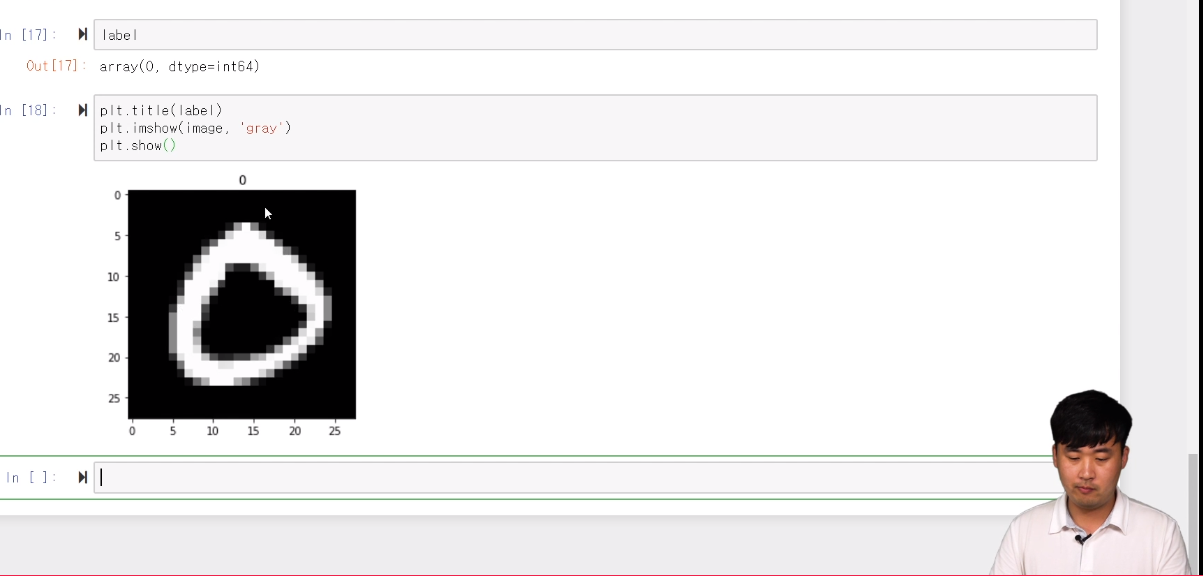
 #시각화 (똑같이 햇는데 예시로 나온 숫자가 왜 다를까)
torch_image = torch.squeeze(images[0])
torch_image.shape
>>> torch.Size([28, 28])
image = torch_image.numpy()
image.shape
>>> (28, 28)
label = labels[0].numpy()
label
>>> array(4, dtype=int64)
plt.title(label)
plt.imshow(image,'gray')
Part2 14~14 각 Layer 역할 개념 및 파라미터 파악
얼마나 보내고 받을지 지정해줘야 함
in_channels : 받게될 채널의 수
out_channels : 보내고 싶은 채널 수
kernel_size : 만들고 싶은 커널(weights)의 사이즈
import torch.nn as nn
import torch.nn.functional as F

layer = nn.Conv2d(in_channels=1, out_channels=20, kernel_size=5, stride=1).to(torch.device('cpu'))
layer
>>> Conv2d(1, 20, kernel_size=(5, 5), stride=(1, 1))

 # weight 시각화
weight = layer.weight
weight.shape
>>> torch.Size([20, 1, 5, 5])
weight = weight.detach().numpy() #detach를 해서 살짝 꺼내와야함 (안하면 에러남)
weight.shape
>>> (20, 1, 5, 5)
plt.imshow(weight[0,0,:,:],'jet')
plt.colorbar()
input/weight/output 시각화
 #output
output_data = layer(image)
output_data = output_data.data
output = output_data.cpu().numpy()
output.shape
>>> (1, 20, 24, 24)
 #input
image_arr = image.numpy()
image_arr.shape
>>> (1, 1, 28, 28)
 #종합시각화
plt.figure(figsize=(15,30))
plt.subplot(131)
plt.title('input')
plt.imshow(np.squeeze(image_arr),'gray')
plt.subplot(132)
plt.title('Weight')
plt.imshow(weight[0,0,:,:],'jet')
plt.subplot(133)
plt.title('Output')
plt.imshow(output[0,0,:,:],'gray')
pooling
nn은 weight값이 있는거
F는 weight값이 없는거
pool = F.max_pool2d(image, 2, 2)
pool.shape
>>> torch.Size([1, 1, 14, 14])
pool_arr = pool.numpy()
pool_arr.shape
>>> (1, 1, 14, 14)
 #시각화
plt.figure(figsize = (10,15))
plt.subplot(121)
plt.title('input')
plt.imshow(np.squeeze(image_arr),'gray')
plt.subplot(122)
plt.title('output')
plt.imshow(np.squeeze(pool_arr),'gray')
Linear
softmax를 사용하기 위해 flatten하게 만드는 과정
flatten = image.view(1,28 *28)
flatten.shape
>>> torch.Size([1, 784])
lin = nn.Linear(784,10)(flatten)
lin
>>> tensor([[ 0.2939,  0.1130,  0.4095, -0.2740,  0.1227, -0.2811, -0.3765, -0.2759,
         -0.1125, -0.2977]], grad_fn=<AddmmBackward>)
 # 시각화
plt.imshow(lin.detach().numpy(),'jet') #weight이 있기 때문에 detach필요
softmax
no_grad 안하면 softmax 결과를 확인할 수 없음 train모드기 때문
with  torch.no_grad():
    flatten = image.view(1,28*28)
    lin = nn.Linear(784, 10)(flatten)
    softmax = F.softmax(lin,dim =1)
 # softmax
>>> tensor([[0.1224, 0.0984, 0.0596, 0.1137, 0.0884, 0.1023, 0.0940, 0.1139, 0.1026,
         0.1047]])
np.sum(softmax.numpy()) #합계가 1인 softmax로 변환됨
>>> 1.0
layer 쌓기
class로 사용해서 하는 것이 일반적이기 때문에 익숙해지면 더 편함
init 부분에 weight가 필요한 layer를 미리 설정해두고
forward 에 Feature Extraction과 Fully Connected 진행
model에서 각 층의 layer을 불러다 확인 또한 가능
class Net(nn.Module):
    def __init__(self):
        super(Net, self).__init__()
        self.conv1 = nn.Conv2d(1,20,5,1)
        self.conv2 = nn.Conv2d(20,50,5,1)
        self.fc1 = nn.Linear(4*4*50, 500)
        self.fc2 = nn.Linear(500,10)

    def forward(self,x):
        # Feature Extraction
        x = F.relu(self.conv1(x))
        x = F.max_pool2d(x, 2,2)
        x = F.relu(self.conv2(x))
        x = F.max_pool2d(x, 2,2)

#         print(x.shape) #사이즈 확인용도
        # Fully Connected (Classification)
        x = x.view(-1, 4*4*50) #사이즈 확인 어려우면 shape print해서 확인
        x = F.relu(self.fc1(x))
        x = self.fc2(x)

        return F.log_softmax(x,dim = 1)

model = Net()
result = model.forward(image)
result
>>> tensor([[-2.2739, -2.3245, -2.2509, -2.3006, -2.2687, -2.3454, -2.3145, -2.3268,
-2.3125, -2.3121]], grad_fn=<LogSoftmaxBackward>)'책&강의 학습 > 올인원 패키지 :딥러닝&인공지능' 카테고리의 다른 글
| [패스트캠퍼스 수강 후기] 인공지능강의 100% 환급 챌린지 9회차 미션 (0) | 2020.07.07 |
|---|---|
| [패스트캠퍼스 수강 후기] 인공지능강의 100% 환급 챌린지 8회차 미션 (0) | 2020.07.06 |
| [패스트캠퍼스 수강 후기] 인공지능강의 100% 환급 챌린지 6회차 미션 (0) | 2020.07.04 |
| [패스트캠퍼스 수강 후기] 인공지능강의 100% 환급 챌린지 5회차 미션 (0) | 2020.07.03 |
| [패스트캠퍼스 수강 후기] 인공지능강의 100% 환급 챌린지 4회차 미션 (0) | 2020.07.02 |


댓글