Part3-17 post process -history
history에 담아줘야 나중에 확인가능
tensorboard가 장점도 많지만, 단점으로는 속도가 느려짐
그래서 history를 시각화하는 방법도 있음
epoch을 늘려서 확인해볼것
50번은 너무 적음
history
history.history
#파라미터 어떤거 줬는지 확인가능
history.params
>>> {'batch_size': None,
 'epochs': 50,
 'steps': 31,
 'samples': 31,
 'verbose': 0,
 'do_validation': True,
 'metrics': ['loss', 'accuracy', 'val_loss', 'val_accuracy']}
시각화
정확도 시각화
plt.plot(history.history['accuracy'])
plt.plot(history.history['val_accuracy'])
plt.title('Model Accuracy')
plt.ylabel('accuracy')
plt.xlabel('epoch')
plt.legend(['train','validation'])
시각화
로스 시각화
plt.plot(history.history['loss'])
plt.plot(history.history['val_loss'])
plt.title('Model Loss')
plt.ylabel('loss')
plt.xlabel('epoch')
plt.legend(['train','validation'])
post process -predict/predict_generator
현재 모델에서 one-hot이 제대로 진행되지 않았기 때문에 모델 성능은 낮음
이런과정으로 확인한다는 점만 알고 현재는 넘어가려함
이미지를 Load 직접 load해서 넣는 방법
path = test_paths[0]
path
>>> 'dataset/cifar/test\\0_cat.png'
gfile = tf.io.read_file(path)
image = tf.io.decode_image(gfile, dtype=tf.float32)
image.shape
>>> TensorShape([32, 32, 3]) #batch가 없는 상태기때문에 추가 필요
image = image[tf.newaxis, ...]
image.shape
>>> TensorShape([1, 32, 32, 3])

pred = model.predict(image)
pred.shape
>>> (1, 10)
pred
>>> array([[1., 0., 0., 0., 0., 0., 0., 0., 0., 0.]], dtype=float32)
generator에서 데이터를 가져오는 방법
test_image, test_label = next(iter(test_dataset))
test_image.shape
>>> TensorShape([32, 32, 32, 3])
pred = model.predict(test_image)
pred.shape
>>> (32, 10)
pred[0]
>>> array([1., 0., 0., 0., 0., 0., 0., 0., 0., 0.], dtype=float32)
np.argmax(pred[0])
>>> 0
generator에 넣는 방법
repeat되는 상태기때문에 .take(1)으로 하나만 진행하게 해야함
take으로 가져오는 예
for image, label in test_dataset.take(2):
    plt.imshow(image[0])
    plt.show()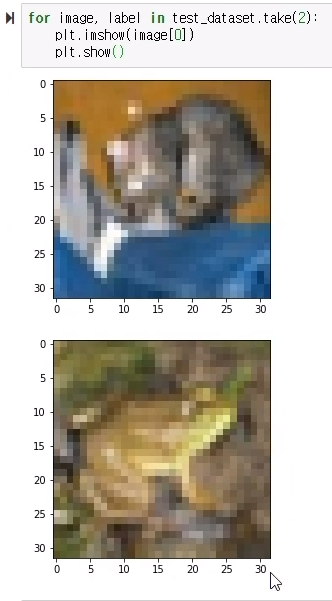
pred = model.predict_generator(test_dataset.take(1))
pred.shape
>>>(32, 10)
evaluate 진행방법
모델을 더 많이 돌려보고 성능 올려서 할 필요가 있음
image, label = next(iter(test_dataset))
image.shape
>>> TensorShape([32, 32, 32, 3])
evals = model.evaluate(image, label)
evals
[1.0728830375228426e-06, 1.0]'책&강의 학습 > 올인원 패키지 :딥러닝&인공지능' 카테고리의 다른 글
| [패스트캠퍼스 수강 후기] 인공지능강의 100% 환급 챌린지 18회차 미션 (0) | 2020.07.16 |
|---|---|
| [패스트캠퍼스 수강 후기] 인공지능강의 100% 환급 챌린지 17회차 미션 (0) | 2020.07.15 |
| [패스트캠퍼스 수강 후기] 인공지능강의 100% 환급 챌린지 15회차 미션 (0) | 2020.07.13 |
| [패스트캠퍼스 수강 후기] 인공지능강의 100% 환급 챌린지 14회차 미션 (0) | 2020.07.12 |
| [패스트캠퍼스 수강 후기] 인공지능강의 100% 환급 챌린지 13회차 미션 (0) | 2020.07.11 |


댓글